By Michael, former real estate photographer in St. Augustine, FL.
Fix Hazy Aerial Photos on Real Estate Drone Listings
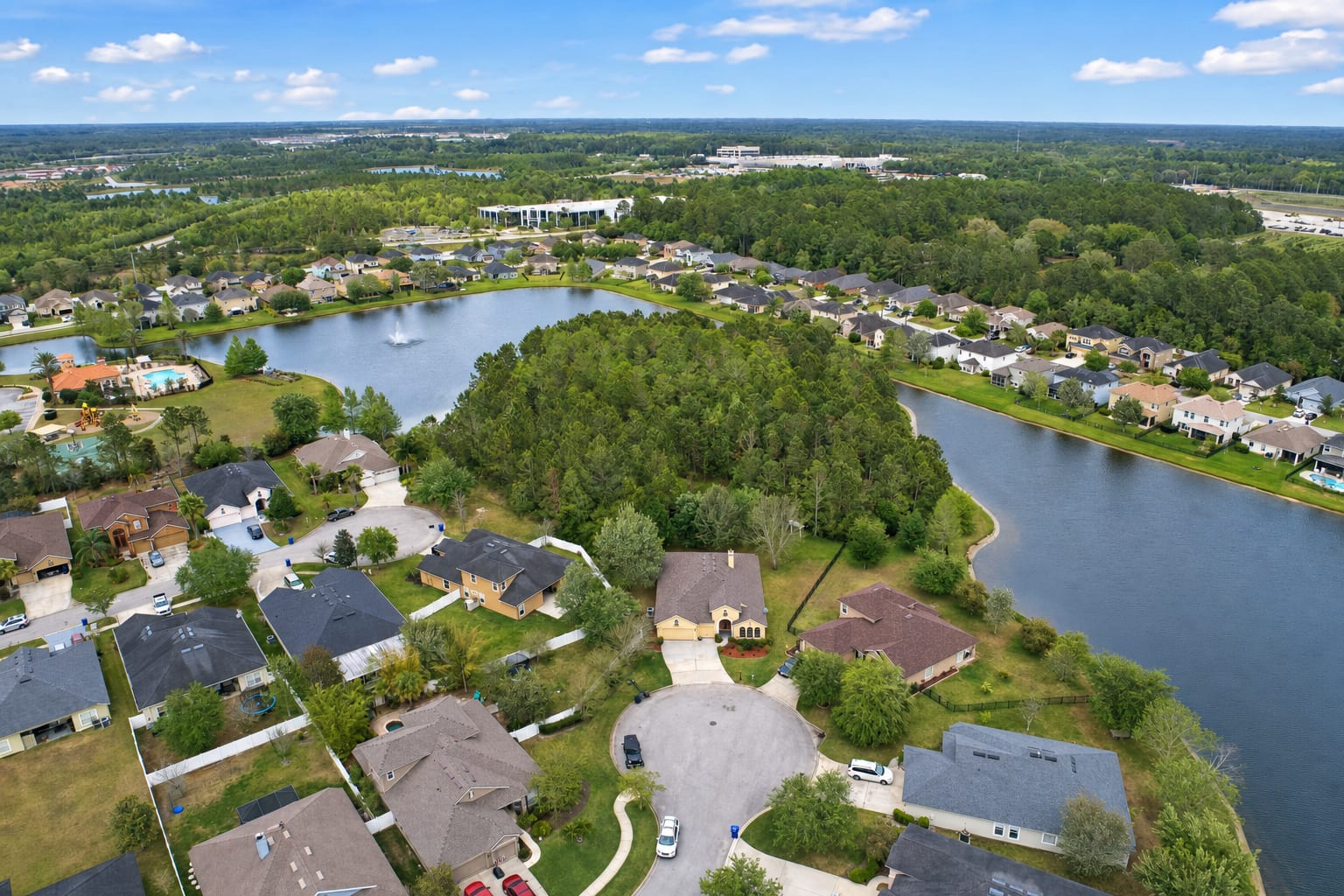
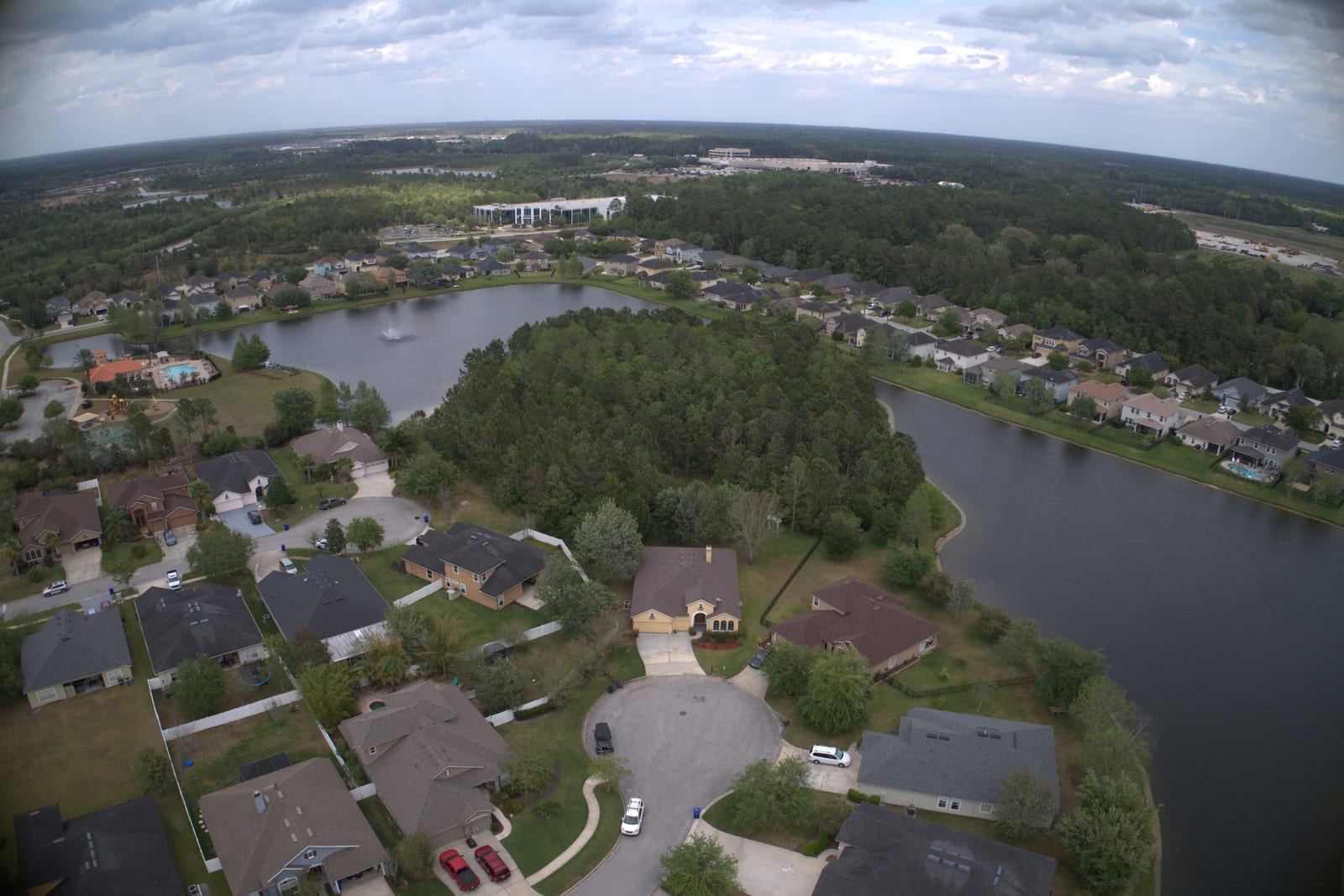
Drone shots come back hazy. The trees look gray-green instead of green, the water looks muddy, the houses in the distance fade into a soft fog, and the horizon line curves where it should be flat. Hazy aerial photos look amateur next to neighbor listings shot on clearer days, even when the drone and the operator are both fine. Most of what is wrong in a drone shot is fixable in editing. Photo enhancement clears the haze, corrects the fisheye distortion, drops the corner vignetting, and brings the color back.
Why hazy aerial photos happen
Aerial haze is partly atmospheric and partly optical. Looking down from a hundred feet up at suburban Florida or any humid coast, there is genuinely more air, moisture, and particulate between the lens and the ground than in a normal eye-level shot. That haze flattens contrast and pulls saturation out of greens and blues. Drone lenses also tend to be wide and uncorrected: the horizon curves, the corners darken, and the geometry is subtly off in a way that buyers feel without naming. These are not pilot errors. They are what wide drone lenses and humid air do every time.
What the fix does
A BiziEdit photo enhancement on a hazy aerial drone photo does several things in one pass. The contrast comes back through the midtones, which is what makes the haze actually lift instead of just being brightened. Greens recover to looking like greens; water recovers to looking like water; the houses in the distance separate from the background. Lens distortion is corrected so the horizon flattens and the buildings stop leaning. Corner vignetting and chromatic edge artifacts are pulled out. Sky enhancement is included on aerials the same way it is on every other outdoor photo: see fix flat overcast skies in listing photos for how that part works.
What stays the same
What the photo actually shows does not change. The houses, the roads, the trees, the pool decks, the waterfront, the angles, the time of day, the framing: all yours. The fix is correcting what the drone lens and the air did to the picture, not changing what the picture is of. Aerial drone photos are the listing's establishing shot, and the agent's neighbors are also shooting drone hero shots, so an aerial that competes is the difference between a listing buyer scrolling past and tapping in.
Pricing
Photo enhancement is $0.79 per image, aerial or eye-level, same price. There is no separate aerial add-on. The first ten enhancements are free with the trial. If the listing also calls for a dusk version of the aerial, see twilight conversion vs sky replacement for how twilight is billed. Per-image rates are listed on pricing.
More from BiziEdit
How to Upscale Real Estate Photos to 24 MP for Print
Upscale real estate photos to 24 MP, about 6000 px, sharp enough for print. BiziEdit enhances and upscales listing photos at $0.99 per image, no subscription.
How to Fix Mixed Lighting in Real Estate Listing Photos
Fix mixed lighting in real estate listing photos with color optimization. BiziEdit unifies split white balance from tungsten and daylight for $0.79 per image.
Twilight Conversion vs Sky Replacement for Listings
Twilight conversion vs sky replacement: one swaps daytime for dusk, the other only swaps clouds. Different services, different prices on a BiziEdit order.
Fix Flat Overcast Skies in Real Estate Listing Photos
Fix flat overcast skies in exterior listing photos at $0.79 per image. Sky enhancement is part of every BiziEdit photo enhancement. First ten free.
Fix Yellow Color Cast in Real Estate Listing Photos
Fix yellow color cast in listing photos at $0.79 per image. Color optimization is part of every BiziEdit photo enhancement. First ten enhancements free.
Twilight Conversion for Real Estate Listing Photos
Twilight conversion turns a daytime listing photo into a twilight shot in minutes. No reshoot. At BiziEdit, $0.79 per twilight on top of the $0.79 enhancement.
Pricing
$0.79 per image. First 10 photos free. No subscription, no credit card to start.
Try 10 photos freeFAQ
- Will my hazy aerial drone photo come back distorted-looking or fake?
- No. The distortion correction is geometric, so the buildings stop leaning and the horizon flattens, but the framing and content stay exactly what you shot. The dehaze is tonal, not painted on. The output looks like a clear-air version of the same drone photo, not a different photo and not a graphic.
- Does it work on aerials with overcast or partly cloudy skies?
- Yes. Sky enhancement is included on every outdoor photo, so the sky comes back cleaner regardless of the original weather. On an overcast day the sky can be replaced; on a partly cloudy day the existing cloud structure is deepened. The dehaze on the ground is the same either way.
- What about vignetting and chromatic aberration in the corners?
- Both are fixed. Corner darkening from a wide drone lens is lifted so the four corners read at the same brightness as the center. Color fringing along high-contrast edges is also pulled out. These are routine corrections inside a BiziEdit enhancement, not a separate add-on, and they are included in the $0.79 per image.