By Michael, former real estate photographer in St. Augustine, FL.
How to Fix Mixed Lighting in Real Estate Listing Photos
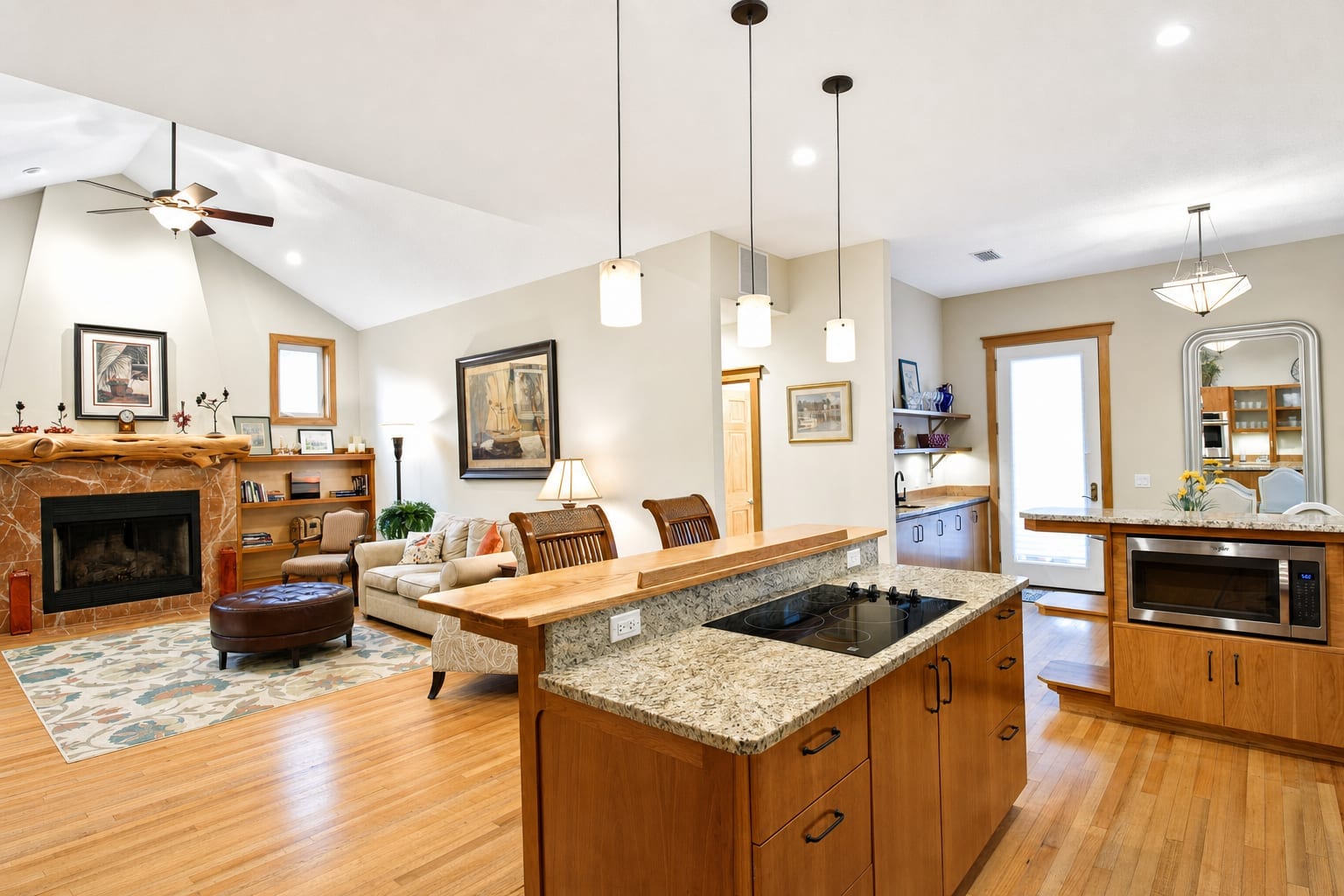
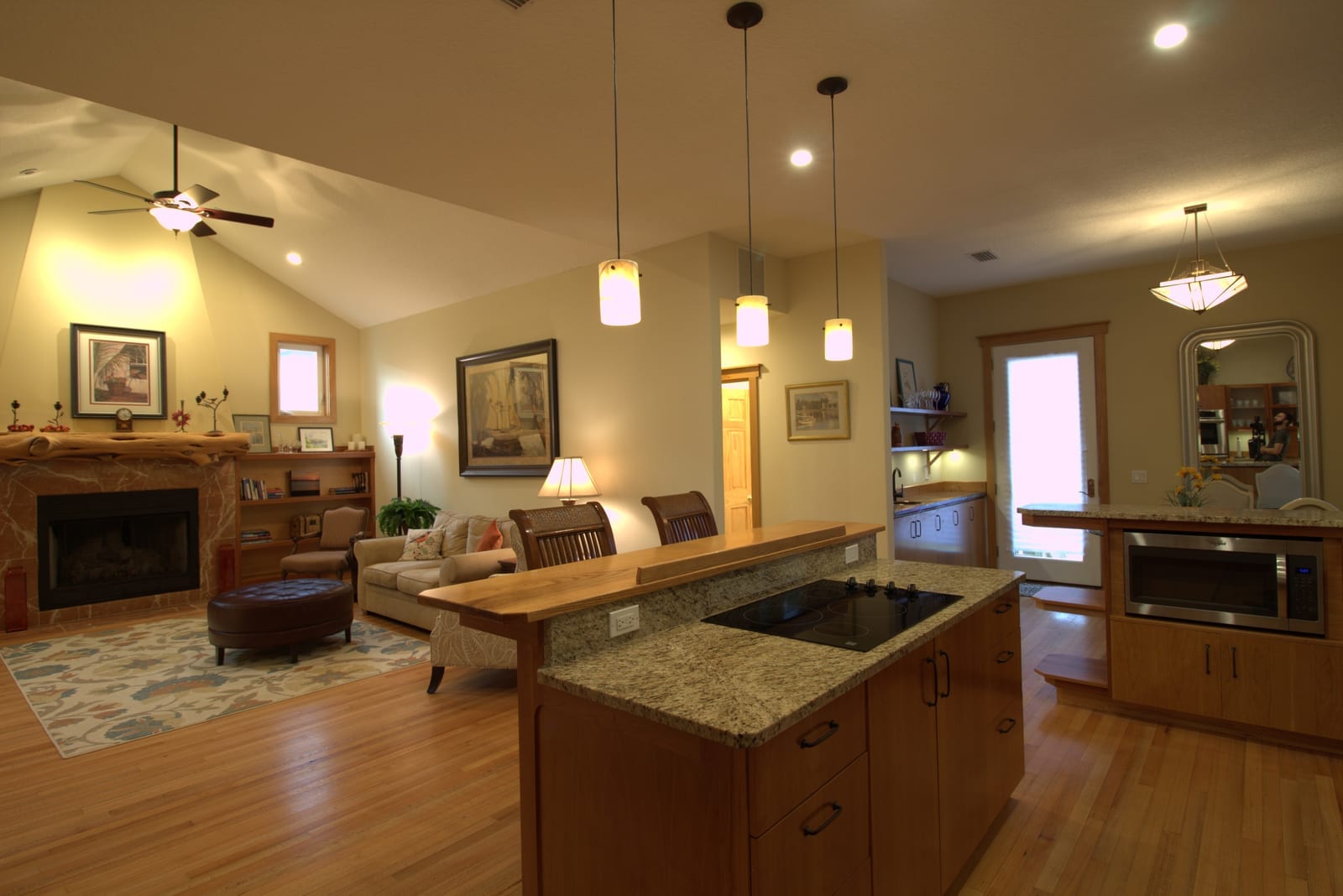
Phone-shot interiors lit by both overhead bulbs and window daylight produce a split white balance. The ceiling and walls go orange-yellow from the tungsten recessed lights and pendants. The far side of the room near the glass door looks blue-gray. Neither color is accurate. Buyers see the clash before they notice the kitchen island or the flooring. Mixed lighting is harder to correct than a single warm cast, but it is a fixable problem.
What is happening in the frame
Incandescent and LED bulbs emit light around 2700-3000 K. Daylight through a window on a clear afternoon is closer to 6000-6500 K. A camera shooting at a fixed white balance has to pick one. It picks the middle, which means both light sources are wrong: the artificial lights go orange, the daylight goes blue.
The result is a frame where the left side of a kitchen and the right side look like they were photographed in different rooms. That split is what buyers notice first.
Why turning off the lights does not always work
The standard advice is to shoot with the overhead lights off so only window light fills the room. That works on bright days in rooms with large windows. It breaks down in lower-light interiors, north-facing rooms, or rooms where the ceiling fixtures are also the only practical task lighting. Turning them off produces a flat, underexposed frame that needs dark interior correction instead.
For many phone-shot listings, mixed lighting is the condition on the day of the shoot. It cannot be fixed in-camera without a bracket or a grey card.
How color optimization addresses it
BiziEdit's Photo enhancement includes color optimization on every image. For mixed-lighting frames, that means neutralizing the orange cast from the tungsten sources, cooling the warm walls and ceiling back to a neutral white, and preserving the natural daylight near the windows without turning it cold. The goal is a consistent color temperature across the whole frame.
This is a different correction from the single-source warm cast covered on the yellow color cast page. A yellow cast from one dominant light source can often be solved with a global white balance shift. A mixed-source cast needs zone-based correction because shifting the whole frame in one direction overcorrects the other light source.
What it does not fix
Color optimization handles the white balance and tone. It does not replace the view through a glass door. If a window in the same frame is blown out to solid white, a separate add-on is needed. Window view restoration composites an exterior view photo into the blown-out glass at +$0.40 per window.
If the room also has cluttered surfaces, Decluttering is available at the light or moderate level as part of the same $0.79 enhancement.
Pricing
Photo enhancement is $0.79 per image and includes color optimization, lighting correction, and sky enhancement on exterior shots. No add-on is needed to fix mixed lighting. See per-image pricing for the full breakdown, start with 10 free enhancements, or browse virtual staging if you also have empty rooms to stage at $2.79 per image.
More from BiziEdit
How to Upscale Real Estate Photos to 24 MP for Print
Upscale real estate photos to 24 MP, about 6000 px, sharp enough for print. BiziEdit enhances and upscales listing photos at $0.99 per image, no subscription.
Fix Hazy Aerial Photos on Real Estate Drone Listings
Fix hazy aerial photos on real estate drone listings. Clear the haze, drop the lens distortion, recover color. $0.79 per image. First ten enhancements free.
Twilight Conversion vs Sky Replacement for Listings
Twilight conversion vs sky replacement: one swaps daytime for dusk, the other only swaps clouds. Different services, different prices on a BiziEdit order.
Fix Flat Overcast Skies in Real Estate Listing Photos
Fix flat overcast skies in exterior listing photos at $0.79 per image. Sky enhancement is part of every BiziEdit photo enhancement. First ten free.
Fix Yellow Color Cast in Real Estate Listing Photos
Fix yellow color cast in listing photos at $0.79 per image. Color optimization is part of every BiziEdit photo enhancement. First ten enhancements free.
Twilight Conversion for Real Estate Listing Photos
Twilight conversion turns a daytime listing photo into a twilight shot in minutes. No reshoot. At BiziEdit, $0.79 per twilight on top of the $0.79 enhancement.
Pricing
$0.79 per image. First 10 photos free. No subscription, no credit card to start.
Try 10 photos freeFAQ
- Can color optimization fix a frame where half the room is orange and half is blue?
- Yes. Photo enhancement includes color optimization that addresses split white balance from mixed light sources. The correction targets the orange cast from incandescent bulbs and the cool cast near windows separately, rather than applying a single global shift that would overcorrect one side.
- Do I need to do anything special when uploading a mixed-lighting photo?
- No. Upload it the same way as any other photo. The color optimization in Photo enhancement handles the correction. If you also have blown-out windows in the same frame, add Window view restoration at checkout for an additional $0.40 per composite.
- What is the difference between mixed lighting and a yellow cast?
- A yellow cast typically comes from one dominant warm light source. Mixed lighting is a split: two light sources at very different color temperatures in the same frame. The correction approach is different. The companion page on yellow color cast covers single-source warm casts in more depth.